Security Groups
Overview
Traffic to and from a VM is controlled using security groups. A security group is an entity that contains one or more rules. Each rule specifies a certain type of traffic that is allowed to or from VMs belonging to that security group. For example, a rule may say that all TCP traffic from a certain CIDR is allowed, or UDP traffic from a certain other security group is allowed. Security groups are default-deny, meaning that any traffic not allowed by a security group's rules is not allowed. For example, a security group with no rule to allow ICMP traffic will be unpingable.
A VM can belong to multiple security groups, and multiple VMs can be in each security group. For a VM in multiple security groups, exactly the traffic allowed by the union of the security groups' rules is allowed. A VM can be added to security groups when it is created, or after creation. Adding a VM to a security group takes effect immediately, without requiring a restart.
A VM with no user-defined security groups will be placed into a default security group which allows all egress traffic, and allows ingress traffic from within the VM's subnet. This default security group will not allow ingress traffic from outside of the VM's subnet.
If you wish to use a public IP on your VM, you will therefore need to define a set of security groups which allow your desired connectivity both within the VM's subnet and towards the internet (as once a security group is assigned to a VM, the default security group will no longer be active).
The rules are relatively flexible. They allow you to control traffic based on one or more of:
- Direction (ingress or egress)
- Protocol ("TCP", "UDP", "ICMP", or "All")
- Port or port range (e.g. 80, 443, or 1000-1100)
- Ports and port-range are only supported if the Protocol is "TCP" or "UDP" and are explicitly disallowed if the protocol is "All" or "ICMP".
- The traffic's origin/destination (IP address, CIDR block, security group or subnet)
There are a few more things to keep in mind about security group traffic:
- Security group traffic is stateful. This means that they automatically allow return traffic for any connection allowed by one of the security group rules.
- Traffic internal to the security group is not allowed by default. If two VMs in the same security group need to communicate, a rule needs to be added to that effect.
The default security group
All Resource Groups come pre-loaded with a default security group called "default-sto-1"
This security group:
- Allows for all egress traffic from the the VM
- Allows for all ingress traffic orignating in the default-sto-1-a subnet (in other words, all traffic coming from other VMs in this zone inside thiwv VPC)
- Drops all other traffic.
This security group can be editted but it is not recommended to do so.
All VMs which do not specify which security group they should be in automatically get added to this security group.
Protocol Support
evroc supports all IP based protocols, such as "IP in IP" and "SCTP". To use such protocols, ensure you use protocol type of "All"
This is particularly important if you are running e.g. a Calico overlay network using IP in IP encapusaltion. If you have ingress rules that only allow TCP and UDP, say, then IP in IP traffic will be dropped.
Security group example
Let's provide a worked example. Suppose we have a deployment with the following tiers:
- Jumphost
- Web tier
- Application tier
- Database tier
SSH (i.e. TCP 22) from the outside world is only allowed to the jumphost, but from the jumphost you can SSH to all the other tiers. The web tier is reachable from the outside world on HTTP(S) (i.e. TCP 80 and 443).
Internally, the web tier can speak to the application tier on TCP 8080, and the application tier can speak to the database tier on TCP 3306.
We can visualise this set-up as follows:
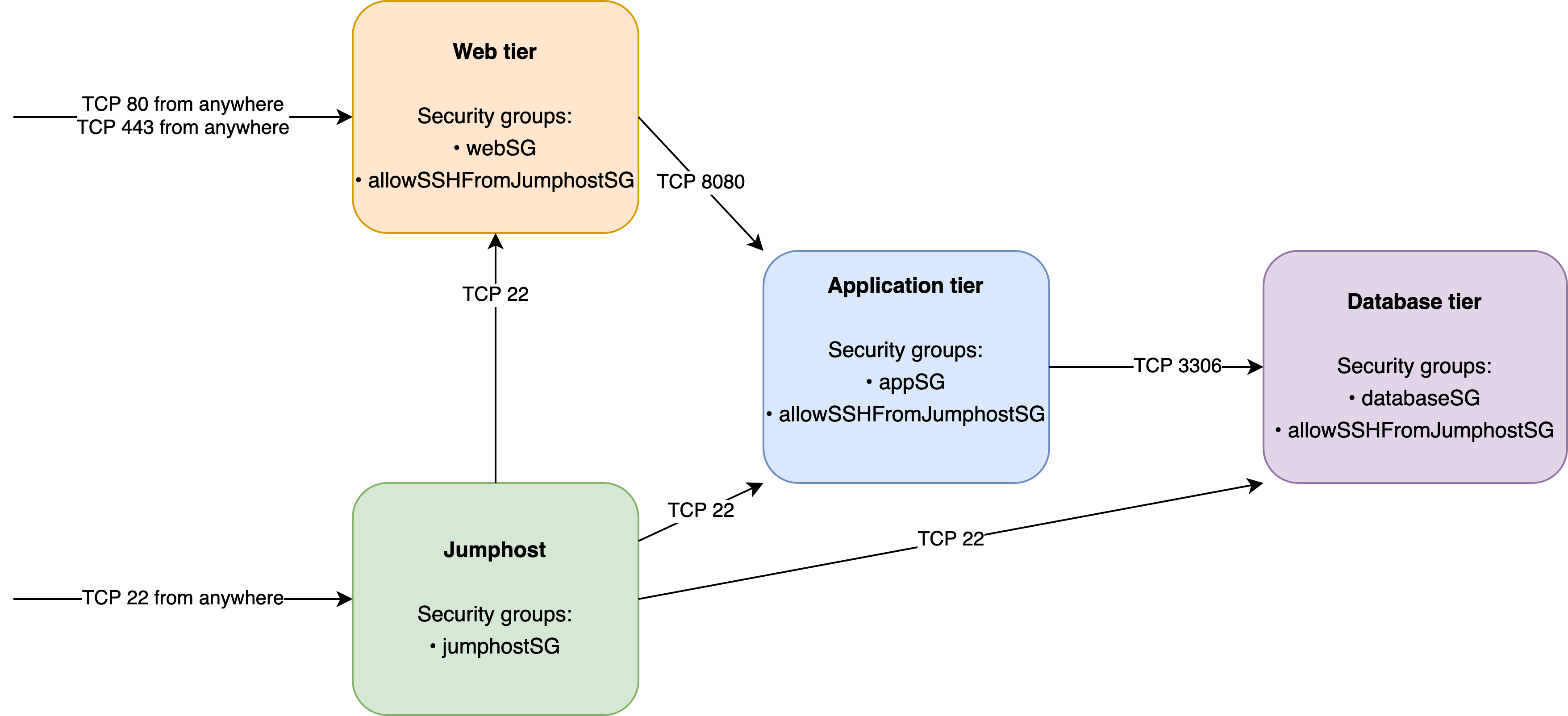
This would correspond to the following security groups:
apiVersion: networking.evroclabs.net/v1alpha1
kind: SecurityGroup
metadata:
  name: jumphostSG
spec:
  rules:
  - direction: Ingress
    name: allowSSHInbound
    port: 22
    protocol: TCP
    remote:
      address:
        IPAddressOrCIDR: 0.0.0.0/0
  - direction: Egress
    name: allowSSHOutbound
    port: 22
    protocol: TCP
    remote:
      securityGroupRef:
        name: allowSSHFromJumphostSG
---
apiVersion: networking.evroclabs.net/v1alpha1
kind: SecurityGroup
metadata:
  name: webSG
spec:
  rules:
  - direction: Ingress
    name: allowHTTPInbound
    port: 80
    protocol: TCP
    remote:
      address:
        IPAddressOrCIDR: 0.0.0.0/0
  - direction: Ingress
    name: allowHTTPSInbound
    port: 443
    protocol: TCP
    remote:
      address:
        IPAddressOrCIDR: 0.0.0.0/0
  - direction: Egress
    name: allow8080AppOutbound
    port: 8080
    protocol: TCP
    remote:
      securityGroupRef:
        name: appSG
---
apiVersion: networking.evroclabs.net/v1alpha1
kind: SecurityGroup
metadata:
  name: appSG
spec:
  rules:
  - direction: Ingress
    name: allow8080WebInbound
    port: 8080
    protocol: TCP
    remote:
      securityGroupRef:
        name: webSG
  - direction: Egress
    name: allow3306DBOutbound
    port: 3306
    protocol: TCP
    remote:
      securityGroupRef:
        name: databaseSG
---
apiVersion: networking.evroclabs.net/v1alpha1
kind: SecurityGroup
metadata:
  name: databaseSG
spec:
  rules:
  - direction: Ingress
    name: allow3306AppInbound
    port: 3306
    protocol: TCP
    remote:
      securityGroupRef:
        name: appSG
---
apiVersion: networking.evroclabs.net/v1alpha1
kind: SecurityGroup
metadata:
  name: allowSSHFromJumphostSG
spec:
  rules:
  - direction: Ingress
    name: allowSSHInbound
    port: 22
    protocol: TCP
    remote:
      securityGroupRef:
        name: jumphostSG
Then, for VMs in each tier, we would ensure they were members of the following security groups:
apiVersion: compute.evroclabs.net/v1alpha1
kind: VirtualMachine
metadata:
  name: jumphost
spec:
  networking:
    securityGroups:
      securityGroupMemberships:
        - name: jumphostSG
---
apiVersion: compute.evroclabs.net/v1alpha1
kind: VirtualMachine
metadata:
  name: web
spec:
  networking:
    securityGroups:
      securityGroupMemberships:
        - name: webSG
        - name: allowSSHFromJumphostSG
---
apiVersion: compute.evroclabs.net/v1alpha1
kind: VirtualMachine
metadata:
  name: app
spec:
  networking:
    securityGroups:
      securityGroupMemberships:
        - name: appSG
        - name: allowSSHFromJumphostSG
---
apiVersion: compute.evroclabs.net/v1alpha1
kind: VirtualMachine
metadata:
  name: database
spec:
  networking:
    securityGroups:
      securityGroupMemberships:
        - name: databaseSG
        - name: allowSSHFromJumphostSG